How to Setup and Use Stripe
Note: You must have a Stripe account to process credit card transactions in QT Office Manager.
Connecting Stripe to QT
To connect your Stripe account to QT Office go to the Account tab in QT and click Stripe Settings.
Click the Connect Your Stripe Account button.

On the next page, login to your Stripe account.

If you have more than one Stripe account you can choose which one to connect to QT. You can also create a new account. We suggest you do not connect the account you use for MK My Shop to QT. From an MK FAQ:
Can I use the Stripe account associated with My Shop to process offline orders?
No, your Stripe account can only be used for your online Shop orders. If you have
offline sales, you have the flexibility to utilize payment types of your choice for
orders where you are directly collecting the money.

Once connected, if you have another payment gateway connected to QT (like ProPay), you will have the option of making Stripe your default payment gateway. This means that invoice payment links emailed to your customers from QT will use your default payment gateway.

Stripe Usage
Once your Stripe account is connected to QT you can charge your customers through Stripe when creating an invoice. To collect payment with Stripe just enter the payment amount in the Stripe field on the invoice. If customer's payment information has not already been entered you will be asked to enter the credit/debit card information. This information will be stored securely by Stripe so you do not have to enter it for every invoice. If payment information has been entered there will be an edit button in case you need to change it.
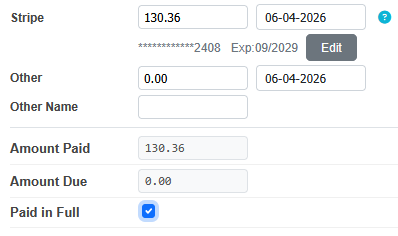
If a Stripe payment is entered and you click Continue you will see a message in red saying "Clicking Confirm will charge the customer's Credit/Debit card ". The transaction will take place when you click Confirm.

Refunds
How do I refund a payment made with Stripe?
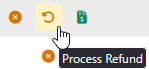
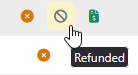
Find your invoice in the Paid Invoices list. Click the Red Arrow to refund the Stripe payment. The circle-slash icon indicates a refunded Stripe payment. When the paid invoice is refunded the invoice will be moved to the Unpaid Invoice list.
Can I refund more than was originally processed by Stripe?
No. You can only refund the amount that you have processed on that credit/debit card for that invoice. Your Stripe account will need to have enough funds to cover the amount of the refund and the refund fee.
Notes
- Return/Exchange Invoices cannot refund to Stripe. If products are returned you can refund by cash or check or give your customer a credit for a future invoice. You can only process a Stripe refund on a Normal Sale Invoice.
- You can store your customer's payment information for use with Stripe, but Stripe invoice payment links cannot be pre-populated with the stored information. You customer will have to enter their payment information each time they pay an invoice from the payment links.