Invoices - Returns and Exchanges (3 of 3)
The third invoice type is for products being returned to you. Most types of returns can be handled on a Normal Sale invoice, but some can only be completed with a dedicated return invoice. When you create a return invoice, all products on the invoice are returned and treated the same way.
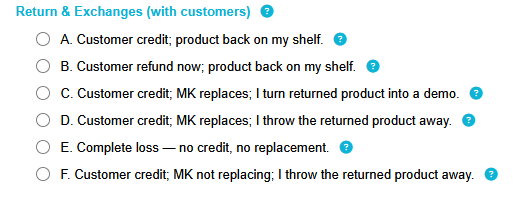
To create a return invoice, open a new invoice and click Change Type. Select one of the Return & Exchange options. (Hover your cursor over the blue question marks for more information.)
Then add the products being returned to the invoice. Enter discounts if the product was originally sold with a discount.
Option B means you are refunding the customer. Option E involves no refund or credit. All other options will credit the customer. The credit will be tracked in QT and can be applied to future invoices.